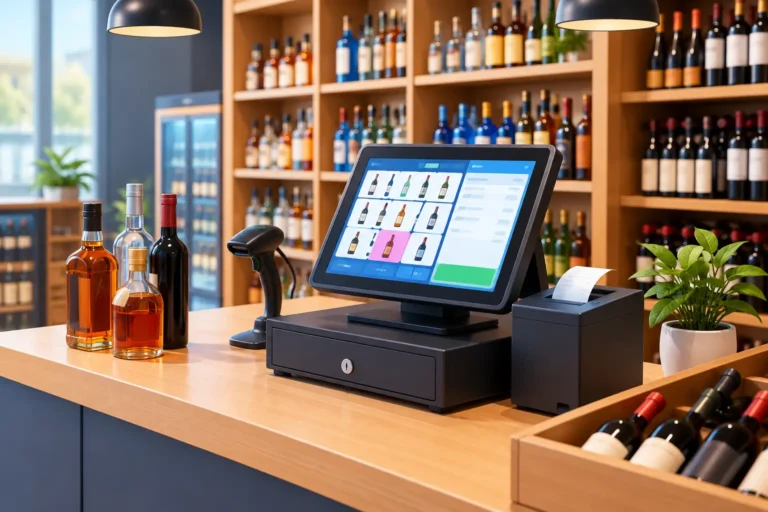
A busy Friday evening can expose every weak point in a liquor store operation. A customer needs a price check, another wants to use a gift card, a popular whiskey is suddenly out of stock, and a new employee is still learning the register. The right liquor store POS software keeps those moments from becoming long lines, lost sales, and frustrated staff.
A point-of-sale system for a liquor store needs to do more than accept credit cards. It should help you control inventory, support age-verification procedures, manage pricing and promotions, and give you a clear view of what is selling. Just as important, it has to be installed correctly, easy for employees to use, and backed by someone who answers the phone when the counter is down.
What liquor stores need from a POS system
Liquor retail has operational needs that differ from a typical gift shop or general retailer. You may carry thousands of SKUs, including products with similar names, different bottle sizes, seasonal releases, and frequent distributor deliveries. Inventory accuracy matters because a missing case of high-value spirits is not a small accounting issue.
Your POS should maintain detailed item records, including UPC codes, bottle size, department, vendor, cost, retail price, and on-hand quantity. That structure makes it easier to receive products, find items at checkout, review margins, and investigate discrepancies. A system that only records total sales will not give an owner enough information to make informed purchasing decisions.
Speed at the register also matters. Cashiers need a clean screen, reliable barcode scanning, quick item lookup, and integrated payment processing. A few seconds saved per transaction can make a meaningful difference during weekend and holiday rushes.
Age verification and transaction controls
A POS system cannot replace employee judgment or state and local alcohol laws. It can, however, support a more consistent checkout process. Depending on the configuration and your business requirements, the register can prompt staff to verify identification, require a date of birth entry, or flag restricted items.
Employee permissions are equally useful. Managers may need access to voids, refunds, price overrides, and inventory adjustments, while cashiers should have only the functions required for normal sales. These controls help reduce mistakes and create a record when exceptions occur.
The right setup depends on how your store operates. A small neighborhood shop may want straightforward prompts and limited permissions. A larger operation with multiple shifts, delivery receiving, or more than one location may need more detailed roles, audit reporting, and centralized management.
Inventory is where liquor store POS software earns its keep
The value of liquor store POS software is often most visible after the sale. When inventory is organized correctly, owners can see what is moving, what is sitting too long, and what needs to be reordered before the shelf is empty.
That starts with clean product data. Each item should be entered consistently, with accurate UPCs and descriptions that employees can recognize. A 750 mL bottle and a 1.75 L bottle of the same brand should not be buried under vague or duplicate item names. Small data problems spread quickly: they slow down checkout, distort reports, and make physical counts harder.
Receiving tools should allow staff to bring in new shipments efficiently and compare delivered quantities against purchase records. Physical inventory tools are also important. No system can prevent every receiving error, scanning mistake, or loss issue, but regular counts matched against POS data give owners a far better starting point for finding the cause.
Useful reporting includes sales by item, category, vendor, employee, day, and time period. Margin reporting can reveal whether a popular product is actually contributing enough profit. Slow-moving reports can help identify products to feature, discount, or stop ordering. These are practical decisions that protect cash flow and shelf space.
Pricing, promotions, and loyalty programs
Liquor stores often run case discounts, mix-and-match offers, holiday specials, and loyalty rewards. Managing those offers manually at the register invites errors, especially when employees are busy. A properly configured POS can apply approved pricing rules consistently and give staff confidence that the advertised offer is ringing correctly.
Loyalty programs and gift cards can also encourage repeat visits, but they should fit your operation rather than add unnecessary complexity. If your customers respond well to points or targeted promotions, those features may be worthwhile. If your business is focused on fast, no-frills service, a dependable gift card program may deliver more value than a complicated rewards structure.
Hardware and network reliability matter just as much
Software is only one part of the counter. A complete POS environment may include touchscreen terminals, cash drawers, receipt printers, barcode scanners, customer displays, payment devices, label printers, and a reliable network connection. One weak component can stop the sale.
For example, an inexpensive scanner that struggles with worn labels can slow every cashier. An unreliable receipt printer can create confusion at the counter. A payment terminal that is not properly integrated can force employees to re-enter totals, increasing the risk of keying errors. The goal is not to buy the most expensive equipment. It is to build a system that fits the transaction volume and can be serviced when it matters.
Your network deserves the same attention. POS terminals, payment devices, office computers, cameras, Wi-Fi, and inventory equipment can all depend on it. A store with unstable internet, aging network hardware, or poorly secured wireless access may experience interruptions that look like POS problems but begin elsewhere.
That is why a turnkey approach is valuable. It brings the hardware, POS configuration, payment processing, networking, installation, and training into one accountable project instead of leaving the owner to sort through multiple vendors.
Questions to ask before choosing a POS provider
Before signing an agreement, ask how the provider handles the parts of the system that happen after the sale. A low monthly software price can look attractive until you discover that installation, menu or inventory setup, hardware programming, training, and support are separate charges.
Ask who will load or assist with your product database. Confirm whether the system can support your pricing structure, promotions, gift cards, employee permissions, and reporting needs. If you have an existing system, discuss how inventory, customer data, and sales history can be handled during the transition.
You should also ask what happens when equipment fails on a Saturday. Is support available by phone? Can someone work remotely? Is on-site service available if the issue involves hardware, cabling, or the network? A remote support desk can be helpful for software questions, but it cannot replace a local technician when a register, printer, or switch needs hands-on attention.
Finally, request a realistic picture of payment processing costs and contract terms. Processing is a necessary part of accepting cards, but the details matter. Owners should understand rates, equipment requirements, support responsibility, and any fees tied to early cancellation or added services.
Installation and training determine the first impression
A POS conversion is not the time to rush. The best implementation includes planning before the equipment arrives, a review of inventory and departments, installation of hardware and network components, payment setup, staff training, and testing before the store depends on the system.
Training should cover more than ringing a sale. Employees need to know how to look up an item, handle a declined payment, process a return according to store policy, respond to an age-verification prompt, and call for help when something does not look right. Managers should know how to run daily reports, close batches, review exceptions, adjust inventory, and manage user access.
Run PC Inc. has served Northern Colorado businesses since 1987 with hands-on POS deployment, technical support, computers, networks, and managed IT services. For liquor store owners, that local accountability can make the difference between a system that is merely delivered and one that is configured to work on day one.
Choose a system you can operate with confidence
The best POS choice is rarely the one with the longest feature list. It is the one that matches your inventory volume, staffing, checkout traffic, reporting needs, and budget while giving you a clear path to service when problems arise.
Start with the real situations your staff faces at the counter and in the stockroom. Build the system around those daily tasks, train people well, and work with a provider that will still be there after installation. Better systems, better service, and better value begin with technology you can count on when the store is busiest.
