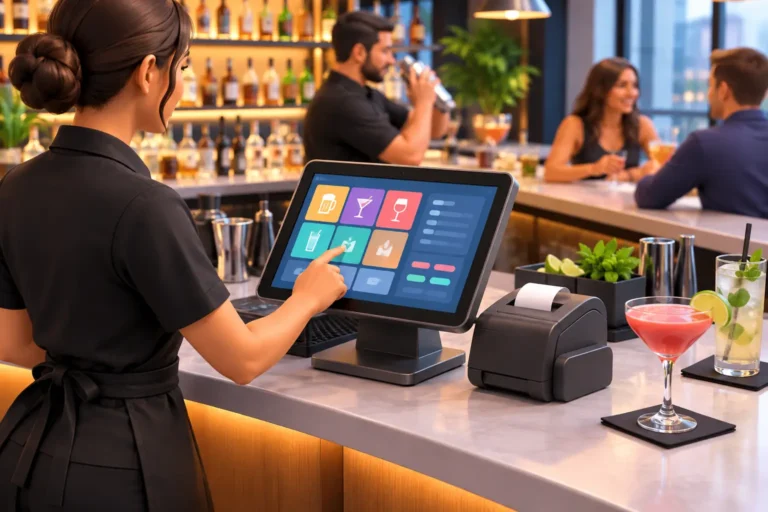
A packed Friday night exposes every weak point behind the bar. A bartender needs to open a tab in seconds, split a check without holding up the next guest, send food to the kitchen, and close out quickly at last call. If the system is slow, confusing, or disconnected from the rest of the operation, the problem is not just technical. It costs sales, tips, staff confidence, and repeat business. The right bar POS system keeps service moving when the room is at its busiest.
For bar owners, the goal is not simply to accept cards. A POS system should give staff a faster way to work while giving management clearer control over sales, inventory, labor, and customer activity. The best fit depends on the type of bar, the menu, the volume of transactions, and whether food service, events, retail sales, or multiple locations are part of the operation.
What a Bar POS System Needs to Do Well
A bar has different demands than a typical retail counter. Tabs stay open for hours. Orders change quickly. Guests may split checks six ways, move from the patio to the bar, or add food after several rounds. Bartenders need an interface that makes common actions fast without forcing them through extra screens.
Speed is the first requirement, but accuracy follows closely behind. A practical system should let staff start and find tabs easily, apply modifiers, transfer checks, manage multiple payment types, add tips, and print or send receipts according to the guest’s preference. When food is involved, bar and kitchen tickets need to reach the right station without handwritten notes or repeated verbal orders.
Management also needs visibility after the rush. Sales reports should show what is selling, when it sells, who rang it in, and how discounts or voids are being used. That information helps owners make decisions about staffing, promotions, menu pricing, and purchasing based on actual business activity instead of guesswork.
Fast Service Starts With the Right Setup
Even capable POS software can become a burden when it is poorly configured. Button layouts should reflect the way your bartenders work. Top-selling beers, common pours, popular cocktails, happy-hour options, and standard modifiers belong where staff can reach them quickly. Less common items can sit on secondary screens.
This is one reason a demonstration matters. Ask to see the system perform the transactions your team handles every day: opening a bar tab, pre-authorizing a card, splitting an itemized check, transferring a tab, applying a comp, and closing a shift. If it takes too many steps in a quiet demo, it will be worse during a rush.
Hardware placement matters just as much. A compact terminal may work for a small back bar, while a high-volume venue may need multiple touchscreen stations, customer-facing displays, receipt printers, cash drawers, and handheld ordering devices. Hardware needs to stand up to spills, heat, constant use, and the limited counter space common in bars.
A good installation also accounts for power, cabling, Wi-Fi coverage, and network security. A payment terminal that loses its connection during a busy night is not a small inconvenience. It can stop the entire operation. The POS, network, payment devices, and backup plan should be treated as one working system.
Inventory Control Is Where the Numbers Add Up
Pour costs are easy to underestimate when inventory is managed by memory and manual counts. A bar POS system can help connect what is sold at the register to what should be leaving the shelf, keg cooler, or liquor room. That makes variance easier to identify before it becomes a recurring expense.
The level of inventory detail should match the business. A neighborhood bar with a focused menu may need simple item counts and purchase reporting. A cocktail-forward venue, liquor store, or multi-location operation may benefit from recipe-level tracking, vendor management, bottle counts, transfers, and stronger reporting by category.
There are trade-offs. Detailed inventory controls produce better information, but they require disciplined setup and regular counts. If every cocktail recipe, bottle size, and modifier is not entered accurately, reports will not tell the full story. Owners should choose controls their team will actually maintain, then build better processes over time.
Look for reporting that can answer practical questions: Which draft beers are moving? Are premium pours increasing? What products sell only during certain events? Is a promotion bringing in additional sales or merely discounting orders customers would have placed anyway? Clear reporting turns the POS into a management tool rather than a digital cash register.
Payment Processing, Tabs, and Guest Experience
Payment processing deserves careful attention because it touches every sale. Your system should support the payment methods your guests expect, including chip cards, contactless payments, digital wallets, gift cards, and secure card-on-file tabs where appropriate. It should also make tip handling simple for guests and staff.
For bars, pre-authorized tabs and fast closing procedures are especially important. A poorly managed tab process can create disputes, slow bartenders, and increase the chance of missed payments. Establish clear house rules for card handling, tab names, card retention when used, and end-of-night procedures. Then make sure the POS configuration supports those rules.
Gift cards and loyalty programs can be worthwhile, particularly for neighborhood bars, taprooms, and venues with regular customers. They work best when they support an existing customer relationship rather than become another task for staff to explain during a line of waiting guests. A simple, well-run program usually outperforms a complicated one.
Support Is Part of the System
A POS purchase is not finished when the hardware arrives. Staff need training that reflects real shifts, not just a quick walkthrough of the menu. Managers need to know how to run reports, edit items, handle refunds, manage employee permissions, and respond when a printer or terminal goes offline.
Support also matters after installation. Bars operate nights, weekends, holidays, and during events when a delayed repair can be expensive. Before choosing a provider, ask who handles installation, who supports the system after go-live, how quickly help is available, and whether the provider can troubleshoot the network and payment hardware as well as the POS software.
Working with separate vendors for terminals, internet, Wi-Fi, computers, payment processing, and POS software can leave owners caught in the middle when something fails. A local technology partner that can assess the full environment, configure the system, train staff, and provide ongoing support creates clearer accountability. Run PC provides that turnkey approach for businesses that need POS technology they can count on in Northern Colorado and beyond.
Questions to Ask Before You Buy a Bar POS System
Before committing, focus on the daily realities of your operation. The answers will help narrow the field and prevent a costly mismatch.
- Can the system handle tabs, transfers, split checks, tips, comps, and voids quickly during peak volume?
- Does it support your food service, kitchen printing, online ordering, events, or retail sales requirements?
- What inventory detail can it track, and what work will staff need to do to keep that data accurate?
- Are payment processing rates, hardware costs, software fees, support fees, and contract terms clearly explained?
- Can it continue operating through a temporary internet problem, and what is the recovery process if hardware fails?
- Who installs the equipment, trains the staff, and answers the phone when your team needs help?
Do not judge a system only by its monthly price. Lower initial costs can be attractive, but limited support, weak hardware, restricted features, or difficult payment terms can become more expensive over the life of the system. At the same time, buying every available feature is not always the right move. Choose the tools that solve current operational problems and leave room to grow.
Build for the Shift You Actually Run
The best bar POS system fits the pace of your business, the experience level of your staff, and the way your guests order and pay. It should make a busy shift feel more controlled, not add another screen for employees to fight with.
Start with your busiest hour, map the transactions that slow your team down, and evaluate systems against those moments. A properly selected, installed, and supported POS system gives your staff a better way to serve customers while giving you the information and reliability needed to run the business with confidence.
