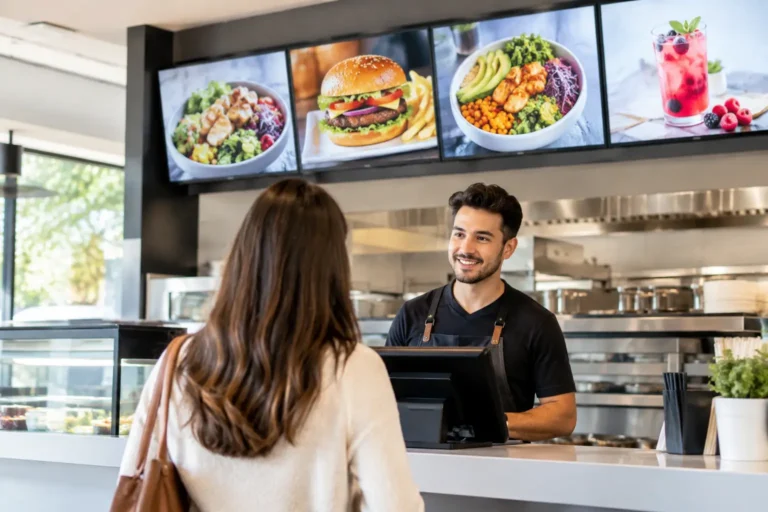
A lunch rush leaves little room for outdated prices, handwritten specials, or a staff member explaining that the menu board has not caught up with the kitchen. Digital menu boards restaurants use well can solve those problems in seconds, but only when the display, content, network, and point-of-sale system are planned as one working system.
For a quick-service restaurant, bar, coffee shop, or multi-location operation, a digital board is more than a bright screen on the wall. It is a customer-facing part of daily operations. It needs to remain readable in changing light, show accurate pricing, reflect available inventory, and keep working when the line is out the door.
What restaurant digital menu boards should accomplish
The best digital menu boards make ordering easier. Customers should be able to scan categories, prices, modifiers, and featured items without stopping the line. That sounds simple, yet many installations fall short because the screens are too small, the layout is crowded, or the content was designed for a desktop monitor instead of a customer standing several feet away.
A useful board also gives management more control. Daypart menus can shift from breakfast to lunch automatically. Happy hour promotions can appear at the right time and disappear when they should. A sold-out item can be removed quickly rather than creating an uncomfortable conversation at the counter.
There is a sales benefit, too. High-margin add-ons, meal upgrades, desserts, and seasonal promotions are easier to feature when menu content can change without reprinting signs. Still, a digital board should not become a moving advertisement that makes the actual menu hard to read. Customers need clear choices first. Motion and promotional content should support the sale, not compete with it.
Start with the service model, not the screen
Before selecting hardware, consider how guests order and how the staff works. A counter-service restaurant may need two or three coordinated menu screens above the register. A bar may need one display for food and another for rotating taps, events, or drink specials. A full-service dining room might benefit more from a waitlist display, private-event screen, or customer-facing order status board than a traditional digital menu.
The viewing environment matters just as much. Sunlight through front windows can make a consumer-grade television difficult to read. Heat near cooking equipment, grease in the air, and long daily operating hours can shorten the life of the wrong display. Commercial-grade screens cost more up front, but they are designed for extended use and often offer better brightness, cooling, mounting options, and warranty coverage.
Screen size and placement should be based on viewing distance. A board that looks sharp from behind the counter may be unreadable from the back of the line. Mounting height, glare, ceiling structure, power access, and cable routing all deserve attention before equipment is ordered. A clean installation is not only about appearance. Protected cabling and properly secured mounts reduce service calls and safety concerns.
Keep content readable at a glance
Menu design is where good technology can lose its value. Use high contrast between text and background, large type, clear pricing, and a consistent hierarchy. Categories should be obvious. Customers should not have to hunt for the difference between a combo price and an individual item price.
Photography can be effective, particularly for a featured entrée or limited-time offer, but too many images make a menu feel busy. A practical rule is to give the guest one primary decision per section. If every item is highlighted, nothing is highlighted.
Content should also reflect what the kitchen can deliver. Promoting a complicated item during a packed shift may create more pressure than profit. Restaurant operators should build promotions around available labor, prep capacity, and inventory, not just what looks good on a screen.
POS integration reduces mistakes and manual work
Digital menu boards can operate as standalone displays, but integration with the point-of-sale system is often where they provide the most operational value. When menu prices, modifiers, and product availability are managed from the POS, staff do not need to update the register and the menu board separately.
The level of integration depends on the POS platform and the menu-board software. Some systems can pull item data directly, while others require scheduled exports or manual updates. For many independent restaurants, a managed content process is enough. For high-volume locations or businesses with frequent price changes, deeper integration may be worth the additional setup and monthly cost.
Ask direct questions before committing to a platform. Can the board reflect price changes from the POS? Can it support multiple locations with different pricing? How quickly can a sold-out item be removed? Who has permission to make changes, and is there a simple approval process? The answer should match the way the business actually operates, not a generic software demonstration.
Payment processing, online ordering, loyalty programs, and inventory tools should be considered as part of the same conversation. A promotion shown on the board should not create a mismatch at the register or online. Consistent pricing and menu descriptions protect customer trust and prevent staff from having to correct avoidable errors.
Build for reliable day-to-day operation
A digital menu board has several parts that can affect uptime: the display, media player, mounting hardware, cabling, power, internet connection, Wi-Fi or wired network, and content-management software. If any one of them is poorly installed or unsupported, the restaurant may be left with a blank screen during business hours.
Wired network connections are often the better choice for fixed displays, especially where guest Wi-Fi, kitchen equipment, and payment terminals already compete for wireless capacity. If Wi-Fi is necessary, the network should be designed for the building and separated appropriately from guest access. A menu board does not handle card data itself, but it still belongs on a professionally managed business network.
Power protection matters as well. A quality surge protector or uninterruptible power supply can help protect screens and media players from electrical events and reduce disruption from brief outages. Remote monitoring can identify an offline player before the restaurant discovers it at opening time.
Support is a real purchasing consideration. Online hardware may look less expensive until a screen fails, a player needs replacement, or a network change takes the board offline. Local installation, training, repair coordination, and a clear support contact give an owner accountability when the system needs attention.
Plan content ownership before launch
Every digital board needs an owner. In a single-location restaurant, that may be the general manager or owner. In a multi-location group, it may be a marketing lead with location managers authorized to handle urgent changes. The key is having a defined process before the first menu update is needed.
Create a small set of approved templates for regular menus, limited-time offers, breakfast or lunch transitions, and emergency notices. Templates keep the visual standard consistent and allow nontechnical staff to make simple changes without redesigning the entire screen. They also make it easier to test a new price or promotion at one location before rolling it out everywhere.
Review content on a schedule. Check prices against the POS, verify descriptions and allergy information, remove expired promotions, and confirm operating hours around holidays. A digital display makes changes easy, but that convenience can create stale content if nobody is responsible for reviewing it.
A turnkey approach prevents expensive gaps
The strongest digital menu board projects begin with an on-site assessment and end with staff who know what to do after installation. That includes selecting commercial displays, planning mounts and cable paths, confirming network capacity, configuring media players, coordinating POS data, training managers, and documenting support procedures.
For Northern Colorado restaurants that want one accountable technology partner, Run PC can help bring POS, network, hardware, installation, and ongoing support into the same plan. That approach is especially useful when a menu-board project is part of a broader upgrade to payment terminals, online ordering, Wi-Fi, or business infrastructure.
A menu board should make the next order easier, not create another system for your team to manage. Choose equipment and support that fit the pace of your restaurant, and the screens will keep doing their job long after the opening-day excitement has passed.